 1
 2
 3
 4
 5
 6
 7
 8
 9
10
11
12
13
14
15
16
17
18
19
20
21
22
23
24
25
26
27
28
29
30
31
32
33
34
35
36
37
38
39
40
41
42
43
44
45
46
47
48
49
50
51
52
53
54
55
56
57
58
59
60
61
62
63
64
65
66
67
68
69
70
71
72
73
74
75
76
77
78
79
80
81
82
83
84
85
86
87
88
89
90
91
92
93
94
95
96
97
98
99
100
101
102
103
104
105
106
107
108
109
110
111
112
113
114
115
116
117
118
119
120
121
122
123
124
125
126
127
128
129
130
131
132
133
134
135
136
137
138
139
140
|
    import javax.imageio.ImageIO;
	import javax.servlet.ServletException;
	import javax.servlet.annotation.WebServlet;
	import javax.servlet.http.HttpServlet;
	import javax.servlet.http.HttpServletRequest;
	import javax.servlet.http.HttpServletResponse;
	import java.awt.*;
	import java.awt.font.FontRenderContext;
	import java.awt.geom.Rectangle2D;
	import java.awt.image.BufferedImage;
	import java.awt.image.ImageConsumer;
	import java.io.IOException;
	import java.io.OutputStream;
	import java.text.SimpleDateFormat;
	import java.util.Date;

	/**
	 * Created by lin on 2016-01-27-027.
	 */
	@WebServlet(name = "IPServlet", value = "/ip.png")
	public class IPServlet extends HttpServlet {
		    protected void doPost(HttpServletRequest request, HttpServletResponse response) throws ServletException, IOException {
	        doGet(request, response);
	    }

    protected void doGet(HttpServletRequest request, HttpServletResponse response) throws ServletException, IOException {
	    //设置文件类型
        response.setContentType("image/png");
        //获取参数
        String w = request.getParameter("w");
        String h = request.getParameter("h");
        String s = request.getParameter("s");
        String c = request.getParameter("c");
        int width = 300, height = 60, size = 18;
        if (s != null) {
            try {//使用try-catch块防止出错
                size = Integer.parseInt(s);
            } catch (Exception e) {
            }
        }

        Font font = new Font("微软雅黑", Font.PLAIN, size);
        BufferedImage img = new BufferedImage(width, height, BufferedImage.TYPE_INT_RGB);
        Graphics2D gd = img.createGraphics();
        gd.setFont(font);

        String ip = getIp(request);
        //ip = "1234::1234::1234::1234::1234::1234::1234::1234";
        Date date = new Date();
        //Java String和Date的转换
        //http://www.cnblogs.com/bmbm/archive/2011/12/06/2342264.html
        SimpleDateFormat sdf = new SimpleDateFormat("yyyy-MM-dd HH:mm:ss (z) E");
        String d = sdf.format(date);
        String me = "Powered By Youth.霖";

        double ipW = getWidth(font, ip, gd.getFontRenderContext()),
                ipH = getHeight(font, ip, gd.getFontRenderContext()),
                dateW = getWidth(font, d, gd.getFontRenderContext()),
                dateH = getHeight(font, d, gd.getFontRenderContext()),
                meW = getWidth(font, me, gd.getFontRenderContext()),
                meH = getHeight(font, me, gd.getFontRenderContext());

        width = (int) ipW;
        if (dateW > width) width = (int) dateW;
        if (meW > width) width = (int) meW;
        width += 2;//留一点点边距
        height = (int) (ipH + dateH + meH + 2);

        if (w != null) {
            width = Integer.parseInt(w);
        }
        if (h != null) {
            height = Integer.parseInt(h);
        }

        //Java生成透明背景图片
        //http://snkcxy.iteye.com/blog/1872229
        img = gd.getDeviceConfiguration().createCompatibleImage(width, height, Transparency.TRANSLUCENT);
        gd = img.createGraphics();
        gd.setFont(font);
        //随机颜色
        Color color = new Color(
                (new Double(Math.random() * 128)).intValue() + 128,
                (new Double(Math.random() * 128)).intValue() + 128,
                (new Double(Math.random() * 128)).intValue() + 128);
        if (c != null) {
            try {
                //Java中颜色的String和Color对象之间的互相转换
                //http://winhack.iteye.com/blog/1843781
                color = new Color(Integer.parseInt(c, 16));
            } catch (Exception e) {
            }
        }
        gd.setColor(color);
        //画矩形框
        gd.drawRect(0, 0, width - 1, height - 1);
		//画字符串drawString(string,x,y)
		//左起x像素,从上往下y像素这个(x,y)是字符串的左下角坐标(不是左上角)
        gd.drawString(d, (float) ((width - dateW) / 2), (float) (height / 3));
        gd.drawString(ip, (float) ((width - ipW) / 2), (float) (height / 3 * 2));
        gd.drawString(me, (float) (width - meW) / 2, (float) (height - 3));
        ImageIO.write(img, "png", response.getOutputStream());
	    }

	    /**
	     * //计算字符串的像素长度与高度
	     * //http://blog.chinaunix.net/uid-79084-id-97205.html
		     * Graphics2D g = (Graphics2D)Toolkit.getDefaultToolkit().getImage("imgname").getGraphics();
	     * //设置大字体
	     * Font font = new Font("楷体", Font.ITALIC | Font.BOLD, 72);
	     * g.setFont(font);
	     * FontRenderContext context = g.getFontRenderContext();
	     * //获取字体的像素范围对象
	     * Rectangle2D stringBounds = font.getStringBounds("text", context);
	     * double fontWidth = stringBounds.getWidth();
	     */
	    private double getWidth(Font f, String str, FontRenderContext context) {
	        return f.getStringBounds(str, context).getWidth();
	    }

	    private double getHeight(Font f, String s, FontRenderContext c) {
	        return f.getStringBounds(s, c).getHeight();
	    }

	 //JSP 获取真实IP地址的代码
	 //http://www.jb51.net/article/21272.htm
    public static String getIp(HttpServletRequest request) {
        String ip = request.getHeader("x-forwarded-for");
        if (ip == null || ip.length() == 0 || "unknown".equalsIgnoreCase(ip)) {
            ip = request.getHeader("Proxy-Client-IP");
        }
        if (ip == null || ip.length() == 0 || "unknown".equalsIgnoreCase(ip)) {
            ip = request.getHeader("WL-Proxy-Client-IP");
        }
        if (ip == null || ip.length() == 0 || "unknown".equalsIgnoreCase(ip)) {
            ip = request.getRemoteAddr();
        }
        return ip;
    }
	}
|
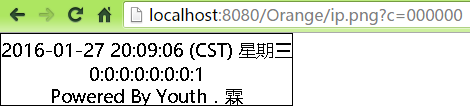

Reader Echoes
7 comments