觉得Web前端也挺好玩的,一直想写WordPress主题,但是自己CSS太渣了。先学学基础的东西吧。看慕课网的视频(
http://www.imooc.com/learn/18 ,
http://www.imooc.com/learn/445 )参考他的代码写了个全屏背景的轮播~
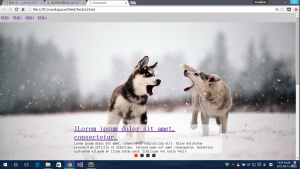
全屏背景轮播
演示:
http://youthlin.com/demo/banner/
首先是HTML的结构,这样:
 1
 2
 3
 4
 5
 6
 7
 8
 9
10
11
12
13
14
15
16
17
18
19
20
21
22
23
24
25
26
27
28
29
30
31
32
33
34
35
36
37
38
39
40
41
42
43
44
45
46
47
48
49
50
51
52
53
54
55
56
<!DOCTYPE html>
<html lang="en">
<head>
<meta charset="UTF-8">
<title>Document</title>
<script src="jquery-2.1.4.min.js"></script>
<script>
jQuery(document).ready(function($){
//代码
})
</script>
<link rel="stylesheet" href="a.css">
</head>
<body>
<header id="site-nav">
<nav>
<ul>
<li><a href="#">链接1</a></li>
<li><a href="#">链接2</a></li>
<li><a href="#">链接3</a></li>
<li><a href="#">链接4</a></li>
</ul>
</nav>
</header>
<div id="banner">
<div id="inner">
<div class="on content" data-imgsrc="img/banner.jpg">
<h1><a href="#">1Lorem ipsum dolor sit amet, consectetur.</a></h1>
<p>Lorem ipsum dolor sit amet, consectetur adipisicing elit. Alias doloribus praesentium officiis at similique, laborum nemo est amet consequatur, molestias quibusdam aliquam ab illum rerum quod. Similique vel nulla velit.</p></div>
<div class="content" data-imgsrc="img/pic01.jpg">
<h1>2.</h1>
<p>2</p></div>
<div class="content" data-imgsrc="img/pic02.jpg">
<h1>3.</h1>
<p>3.</p></div>
<div class="content" data-imgsrc="img/pic03.jpg">
<h1>4.</h1>
<p>4.</p></div>
</div>
<div id="buttons">
<span class="on"></span>
<span></span>
<span></span>
<span></span>
</div>
<a href="javascript:;" class="arrow" id="prev"> </a>
<a href="javascript:;" class="arrow" id="next"> </a>
</div>
<div id="main-content">
<article>Lorem ipsum</article>
<article>Lorem ipsum</article>
<article>Lorem ipsum</article>
</div>
<footer></footer>
</body>
</html>
然后是CSS,从上到下按照顺序写的,都是参照上面两个链接的视频写的,不过那个按钮组里的按钮我改成了方的,圆的不好看(-。-;)
设置背景图拉伸:
background-size: cover;
自定义鼠标样式:
cursor: url('img/prev.ico'),pointer;
 1
 2
 3
 4
 5
 6
 7
 8
 9
10
11
12
13
14
15
16
17
18
19
20
21
22
23
24
25
26
27
28
29
30
31
32
33
34
35
36
37
38
39
40
41
42
43
44
45
46
47
48
49
50
51
52
53
54
55
56
57
58
59
60
61
62
63
64
65
66
67
68
69
70
71
72
73
74
75
76
77
78
79
80
81
82
83
84
85
86
87
88
89
90
91
92
93
94
95
*{
	margin: 0;padding: 0;
}
#banner{
	background: url(img/banner.jpg) center no-repeat;
	background-size: cover;
}
header#site-nav{
	height: 100%;

}
#site-nav nav ul li{
	display: inline-block;
	line-height: 40px;
	margin: 0;
	padding: 0;
}
#site-nav nav{
	position: fixed;
	width: 100%;
	background: #ccc;
	z-index: 3;
}
#site-nav nav a{
	padding: 0 4px;
	display: inline-block;
	line-height: inherit;
	text-decoration: none;
}
#site-nav nav a:hover{
	background: rgba(0,0,0,0.1);
	color: #4eb;
}
#banner #inner{
	width: 50%;
	position: absolute;
	bottom: 5%;
	left: 25%;
	background: rgba(255,255,255,.6);
}
#banner #inner .content{
	display: none;
}
#banner #inner .on{
	display: block;
}

#buttons {
	position: absolute;
	z-index: 2;
	bottom: 2%;
	left: 45%;
}
#buttons span {
	cursor: pointer;
	float: left;
	border: 1px solid #fff;
	width: 15px;
	height: 15px;
	background: #333;
	margin: 0 5px;
}
#buttons .on {
	background: orangered;
}

#banner .arrow {
	display: none;
	text-align: center;
	font-size: 36px;
	font-weight: bold;
	width: 25%;
	height: inherit;
	line-height: inherit;
	position: absolute;
	z-index: 2;
	bottom: 0;
	color: #fff;
	text-decoration: none;
}
#banner:hover .arrow{
	display: block;
	text-decoration: none;
}
#prev{
	left: 0;
	/* http://blog.csdn.net/renfufei/article/details/39339185
	   http://www.haotu.net/icon/201038/next
	*/
	cursor: url('img/prev.ico'),pointer;
}
#next{
	cursor: url('img/next.ico'),pointer;
	right: 0;
}
关键的jQuery代码:
首先是使背景全屏:
1
2
3
4
5
6
7
// 在此网站看到的全屏效果:http://hairproject.ch/fr/
//获取浏览器可视区域高度
$('#banner').height($(window).height());
//浏览器调整窗口时也调整高度
$(window).resize(function(){
	$('#banner').height($(window).height());
})
然后是各个变量的设置:
 1
 2
 3
 4
 5
 6
 7
 8
 9
10
/ / 各 变 量
var banner = $ (' #banner ' );
var inner = $ (' #inner ' );
var buttons = $ (' #buttons span ' );
var prev = $ (' #prev ' );
var next = $ (' #next ' );
var index = 0 ;
var len = buttons. length;
var interval = 3000 ;
var timer;
完了后依次按照需要写各个功能,首先切换下一个的效果:
 1
 2
 3
 4
 5
 6
 7
 8
 9
10
11
12
13
next.bind('click',function(){
	//http://www.w3school.com.cn/jquery/event_bind.asp
	//bind() 方法为被选元素添加一个或多个事件处理程序,并规定事件发生时运行的函数。
	if(banner.is(':animated'))return;
	//http://www.w3school.com.cn/jquery/selector_animated.asp
	//:animated 选择器选取当前的所有动画元素。
        //如果正在动画则不响应本次点击,直接return

	inner.find('div').eq(index).removeClass('on');
	index++;
	if(index>len-1)index=0;
	animate();
})
因为背景变换在很多个地方都要用,所以写成一个函数animate:
 1
 2
 3
 4
 5
 6
 7
 8
 9
10
11
12
13
14
15
function animate(){
var img = inner. find(' div ' ). eq(index). attr(' data-imgsrc ' );
/ / http:/ / www. w3school. com. cn/ jquery/ attributes_attr. asp
/ / attr()获 取 属 性
/ / console. log(img);
banner. fadeTo(500 ,0.5 ,function(){
banner. css(' background-image ' ,' url( ' + img+ ' ) ' );
banner. css(' opacity ' ,0.5 );
banner. fadeTo(500 ,1 );
});
/ / http:/ / www. w3school. com. cn/ jquery/ effect_fadeto. asp
/ / fadeTo() 方 法 将 被 选 元 素 的 不 透 明 度 逐 渐 地 改 变 为 指 定 的 值 。
inner. find(' div ' ). eq(index). addClass(' on ' );
showButton();
}
函数showButton作用是高亮显示当前按钮:
1
2
3
4
5
function showButton(){
	buttons.eq(index).addClass('on').siblings().removeClass('on');
	//http://www.w3school.com.cn/jquery/traversing_siblings.asp
	//siblings()获取同胞元素,不包括自己
}
再绑定点击上一个的事件:
1
2
3
4
5
6
7
prev.bind('click',function(){
	if(banner.is(':animated'))return;
	inner.find('div').eq(index).removeClass('on');
	index--;
	if(index<0)index=len-1;
	animate();
})
点击每个按钮的切换:
 1
 2
 3
 4
 5
 6
 7
 8
 9
10
11
buttons.each(function(){
	$(this).bind('click',function(){
		if(banner.is(':animated') || index == buttons.index(this))return;
		inner.find('div').eq(index).removeClass('on');
		//获取所点击元素的序号
		//http://bbs.csdn.net/topics/340208277
		index = buttons.index(this);
		//console.log(index);
		animate();
	})
})
还要设置自动播放:
 1
 2
 3
 4
 5
 6
 7
 8
 9
10
11
12
13
14
15
16
17
18
19
function play() {
    timer = setTimeout(function () {
    //http://www.w3school.com.cn/jsref/met_win_settimeout.asp
    //setTimeout() 方法用于在指定的毫秒数后调用函数或计算表达式。
    next.trigger('click');
    //http://www.w3school.com.cn/jquery/event_trigger.asp
    //trigger() 方法触发被选元素的指定事件类型。
    play();
    //提示:setTimeout() 只执行 code 一次。如果要多次调用,请使用 setInterval() 或者让 code 自身再次调用 setTimeout()。
    }, interval);
}
function stop() {
   clearTimeout(timer);
    //http://www.w3school.com.cn/jsref/met_win_cleartimeout.asp
    //clearTimeout() 方法可取消由 setTimeout() 方法设置的 timeout。
}
inner.hover(stop,play);//覆盖在文字上时暂停动画,移开继续
//.hover(hoverIn,hoverOut)
play();//上面是定义,这里是调用
注释都是我自己查的各个用法,挺好懂的。完整代码可以看Demo的源代码……^_^

Reader Echoes
10 comments